On magasin.dk, it is possible to create a Match, which links related products to be shown together under the “Complete the Look” section.
See an example below.
This feature helps customers easily find coordinating items. For example, when uploading a suit, you can assign a MatchID that connects both the trousers and the blazer.
Setting up a MatchID is simple – it just requires that the same matching text is assigned to all relevant products. In other words, the exact same Match value must be listed for each item you want to link together.
Example of correct file setup
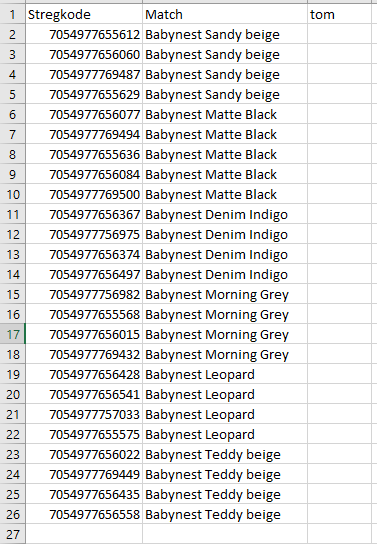
The file must be structured with the following column headers:
Barcode
Enter the barcode of the product you want to link. If the product comes in multiple sizes, include all barcodes for that item.Match
Enter the shared key here – this is the identical text that will link products together. All products with the same Match value will be displayed together under “Complete the Look”.empty
This column should simply be titled empty. Our system requires a minimum of three columns, so this is used as a placeholder. It does not matter whether the column contains any data or not.
The file "MOOS Match" is attached to this guide and contains the correct structure and format. The file must be saved as a CSV file with semicolon separator (CSV-Semicolon) and uploaded in the same way you normally submit products or pricats.
Important: Do not rename the file. The filename must start with “MOOS” in order to be processed by the system.
Example of an uploaded match